
How to Buy a Binance Gift Card and Pay Your Invoice
STEP 1: Click "Buy Gift Card Now" On Invoice
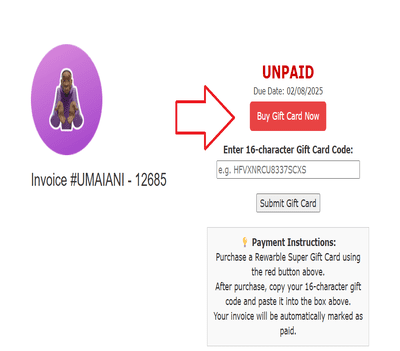
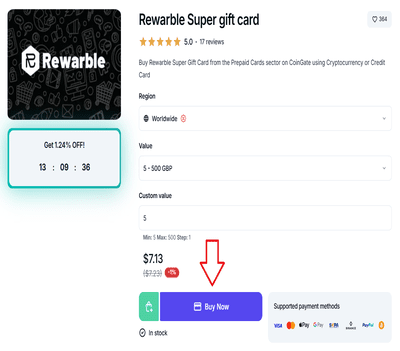
STEP 2: Choose the Amount
Pick the same amount as your invoice.
Example: $15, $40, $70, etc.
Click Buy now
STEP 3: Enter Your Email
Type your email where you'll receive the gift card.
STEP 4: Choose Payment Method
Select how you want to pay:
Visa / Mastercard
Apple Pay / Google Pay
PayPal
Crypto (BTC, USDT, ETH, etc.)
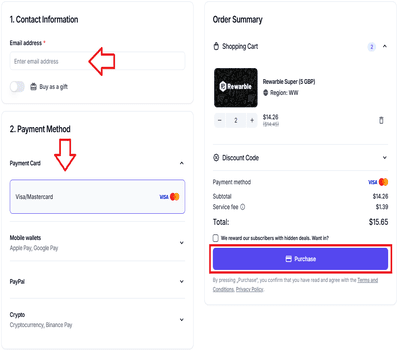
Then complete your payment.
STEP 5: Get Your Gift Card
You’ll get an email with the gift card.
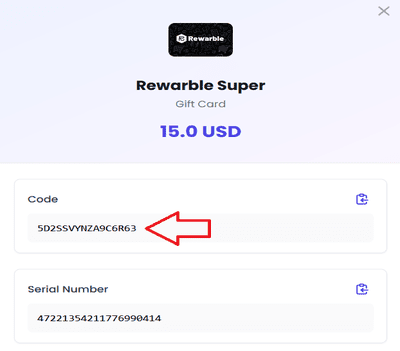
Click "View Gift Card"
Copy the 16-character code
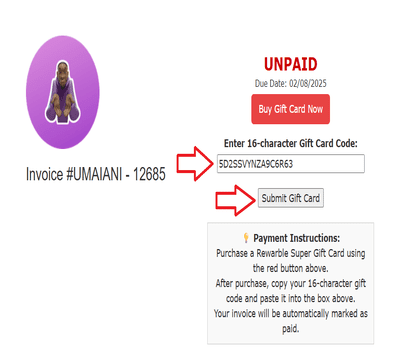
Example: 5D2SSVYNZA9C6R63
STEP 6: Pay Your Invoice
-
Go to your invoice in Khaby IPTV
-
Paste the code in the gift card box
-
Click "Submit Gift Card"
Done!
Your invoice will be marked as PAID automatically — no need to do anything else!
If you need help, message us on WhatsApp:
https://wa.link/khabyiptv
